


A good wireless keyboard can make a major difference to your daily workflow. Whether you work from home, travel with a tablet, use multiple devices, type for long hours, or play games, the ideal keyboard depends on more than just its appearance.
In this comparison, we examine five options designed for very different users:
- Logitech Wave Keys for Business
- Logitech Pebble 2 Combo
- Logitech POP ICON Combo
- Portronics Bubble Multimedia Wireless Keyboard
- KARNAGE by EVM Visage RGB Wireless Gaming Keyboard
The best choice depends on your main priority: ergonomics, portability, multi-device switching, quiet typing, budget value, or gaming features.
Logitech Wave Keys for Business — Best for Ergonomic Typing

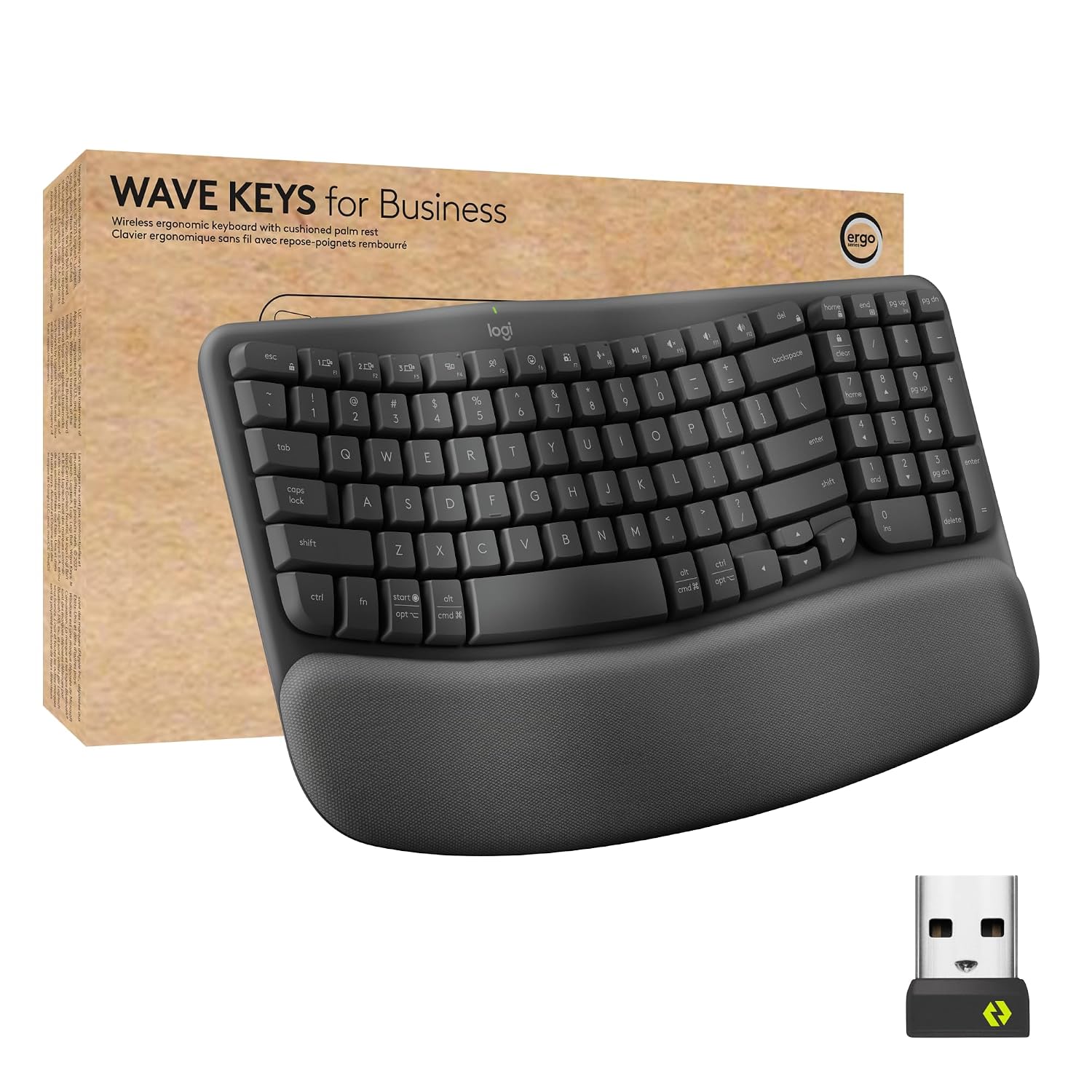
The Logitech Wave Keys for Business is the strongest option here for users who spend long hours typing. Its wave-shaped layout and cushioned memory-foam palm rest are designed to support a more natural hand, wrist and forearm position.
Logitech lists Logi Bolt and Bluetooth Low Energy 5.1, up to 10 metres of wireless range, Easy-Switch support for up to three channels, compatibility across major platforms, and battery life of up to 36 months using two AAA batteries.
- Office professionals
- Writers and content creators
- Long work sessions
- Users prioritizing comfort
- Windows, Mac, ChromeOS and Linux users
- Ergonomic wave design
- Cushioned palm rest
- Logi Bolt security
- Multi-device support
- Very long claimed battery life
- Logi Options+ customization
Logitech Pebble 2 Combo — Best for Portable Productivity


The Logitech Pebble 2 Combo is ideal for users who want both a keyboard and mouse in one compact setup. Logitech’s support documentation lists a wireless scissor-style keyboard and companion mouse, with Bluetooth support, Logi Bolt compatibility, Logi Options+ software support and a wireless range of approximately 10 metres.
The keyboard uses two AAA batteries and Logitech lists battery life exceeding 50 months in its specifications, while the mouse uses one AA battery with a listed battery life of up to 24 months.
- Students
- Remote workers
- Tablet users
- Frequent travellers
- Minimal desk setups
- Keyboard and mouse included
- Compact and portable
- Quiet typing experience
- Multi-device ecosystem
- Logi Options+ support
Logitech POP ICON Combo — Best for Multi-Device Style and Customization

The Logitech POP ICON Combo combines a compact keyboard and mouse with a focus on personalization and multi-device use. Logitech lists the keyboard as a Bluetooth Low Energy scissor keyboard with approximately 1.8 mm key travel, two AAA batteries and a claimed battery life exceeding 36 months. The mouse uses an AA battery and is rated for more than 24 months.
The combo is particularly suitable for users who want programmable controls through Logitech’s software ecosystem and a compact desk setup.
- Creative professionals
- Multi-device users
- Students
- Home office users
- Users who value design and customization
- Keyboard + mouse combo
- Customizable controls
- Bluetooth connectivity
- Compact form factor
- Long claimed battery life
Portronics Bubble — Best Budget Wireless Keyboard

The Portronics Bubble is aimed at buyers who want an affordable, compact keyboard for everyday typing. Based on the supplied product specification, it supports both 2.4 GHz wireless and Bluetooth 5.0, allowing it to work with PCs, tablets and smartphones.
Its compact and quiet design makes it particularly attractive for basic office work, online learning and portable use.
- Budget buyers
- Students
- Tablet users
- Basic office work
- Quiet environments
- Affordable
- Compact design
- 2.4 GHz and Bluetooth connectivity
- Compatible with multiple device types
- Quiet typing focus
KARNAGE by EVM Visage RGB — Best Wireless Keyboard for Gaming

The KARNAGE by EVM Visage is the most gaming-oriented keyboard in this comparison. According to the supplied listing, it features an 84-key layout, RGB backlighting, Bluetooth 5.0, 2.4 GHz wireless and USB-C connectivity, giving users three connection modes.
Additional listed features include a 2000 mAh battery, semi-mechanical key design, volume knob and integrated display, making it significantly more feature-focused for gaming and visual customization than the office-oriented options.
- PC gamers
- RGB enthusiasts
- Users who want wireless and wired flexibility
- Compact desk setups
- Windows and Mac users
- Triple-mode connectivity
- RGB backlighting
- Semi-mechanical design
- Dedicated volume knob
- Built-in display
- 2000 mAh battery
FAQ
H3: Which is the best wireless keyboard overall?
For office work and long typing sessions, the Logitech Wave Keys for Business is the strongest overall option in this comparison because of its ergonomic wave design, palm rest, Bluetooth and Logi Bolt connectivity, and long claimed battery life.
H3: Which wireless keyboard is best for gaming?
The KARNAGE by EVM Visage RGB is the most gaming-focused choice because it offers triple-mode connectivity, RGB lighting, a semi-mechanical design, volume control and a compact gaming layout.
H3: Which is best for office work?
The Logitech Wave Keys for Business is the best choice for users who type for extended periods, while the Logitech Pebble 2 Combo is a good option for portable office setups.
H3: Which keyboard is best for carrying with a laptop or tablet?
The Logitech Pebble 2 Combo and Portronics Bubble are better suited to portability due to their compact designs.
H3: Do I need Bluetooth or a USB receiver?
Bluetooth is convenient for tablets and phones, while USB receivers can be useful for desktop computers or when you want a dedicated wireless connection. Some keyboards, such as the models in this comparison, support more than one connection method.
H3: Is an ergonomic keyboard worth buying?
If you spend many hours typing, an ergonomic keyboard may be worth considering because the shape, wrist support and layout can improve comfort. Personal preference remains important, and it may take time to adapt to a different layout.


